
AI writing tools have made it easier than ever to create articles, emails, reports, product descriptions, and social media posts.
The problem is that AI-generated content often still sounds AI-generated.
Predictable sentence structures, generic introductions, excessive transitions, repetitive wording, and overly polished phrasing can make otherwise useful content feel artificial.
That is exactly the problem UltraHumanizer is designed to solve.
UltraHumanizer is an AI humanizer that rewrites AI-assisted drafts into more natural, readable language while attempting to preserve the original meaning, facts, tone, and important details.
But how good is it in practice?
In this UltraHumanizer review, we’ll look at how the tool works, its main features, advantages and limitations, and whether it is worth using in 2026.
What Is UltraHumanizer?
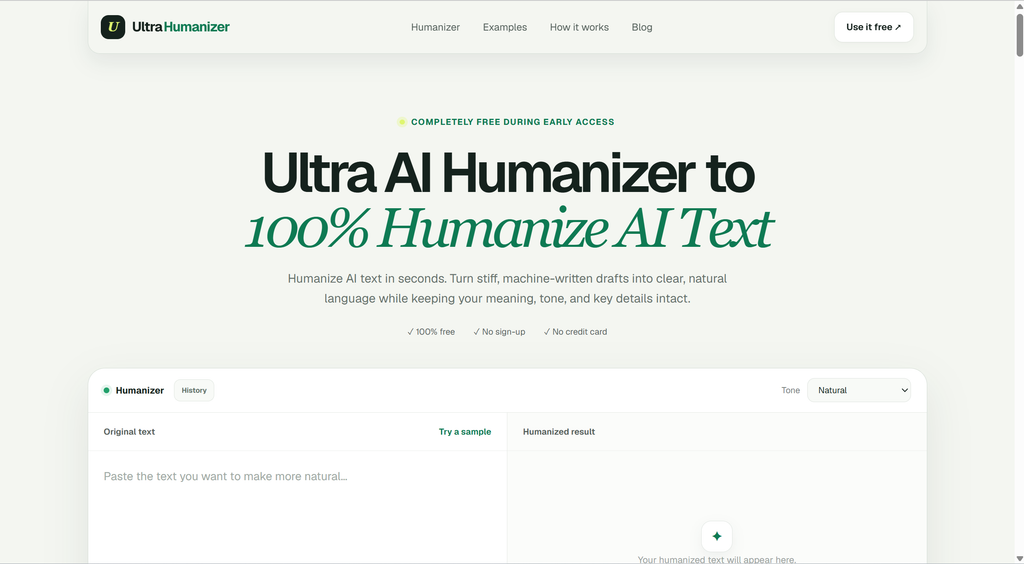
UltraHumanizer is an online AI text humanizer designed to make AI-generated writing sound more like something a person would naturally write.
Instead of generating an entirely new article from scratch, the tool focuses on improving an existing draft.
You paste your AI-generated text into the editor, choose a tone, and UltraHumanizer rewrites the content with more natural sentence structures, transitions, vocabulary, and rhythm.
The goal isn’t simply to replace a few words with synonyms.
UltraHumanizer attempts to improve the overall writing style while preserving the meaning of the original text.
According to its current website, the tool is completely free during early access, doesn’t require an account or credit card, and supports up to 1,500 words per request.
That makes it particularly accessible compared with many AI humanizers that immediately place their best rewriting features behind a subscription.
UltraHumanizer Review: Quick Verdict
Rating: 4.6/5
UltraHumanizer is a surprisingly capable AI humanizer for users who mainly want AI-generated content to sound less generic and more natural.
Its biggest strengths are simplicity, tone control, meaning preservation, and the fact that the current version can be used without registration.
It works particularly well on:
- AI-generated blog content
- Marketing copy
- Business emails
- Product descriptions
- Reports
- Social media posts
- Scripts
- AI-assisted academic or professional drafts
It is also noticeably more focused than a traditional paraphrasing tool.
Instead of aggressively replacing vocabulary, UltraHumanizer tries to change sentence rhythm, remove predictable AI phrasing, and improve readability.
However, users should understand one important limitation: no AI humanizer can guarantee that rewritten text will bypass every AI detector.
UltraHumanizer itself explicitly acknowledges this rather than promising guaranteed detector scores.
Overall, if your goal is to turn an awkward ChatGPT or other AI-generated draft into cleaner, more human-sounding writing, UltraHumanizer is worth trying—especially while it remains free.
How Does UltraHumanizer Work?
UltraHumanizer keeps the process extremely simple.
Step 1: Paste Your AI Text
Start by pasting your AI-generated draft into the UltraHumanizer editor.
You can also upload supported plain-text files rather than copying the content manually.
The current tool accepts up to 1,500 words at a time.
For longer articles, you can divide the content into several logical sections.
Step 2: Choose Your Tone
One of the more useful UltraHumanizer features is tone selection.
Currently, you can choose between:
Natural
Best for general-purpose writing. It makes the text smoother without making it noticeably more casual or formal.
Conversational
Useful for blog posts, social media posts, newsletters, marketing copy, and casual communication.
Professional
Better suited to reports, workplace communication, proposals, business emails, and other more formal content.
UltraHumanizer uses the selected tone to influence phrasing and sentence rhythm while keeping the central message intact.
Step 3: Humanize the Text
Click the humanization button and UltraHumanizer generates a rewritten version.
The resulting text tends to use:
- More varied sentence lengths
- Less predictable transitions
- Simpler phrasing
- More natural vocabulary
- Fewer generic AI expressions
- Better conversational rhythm
You can then review and edit the output before using it.
This last step is important.
AI humanizers should ideally be treated as editing tools rather than automatic publishing tools.
What Makes UltraHumanizer Different?
There are dozens of AI humanizer tools available today.
Many work like glorified synonym replacers.
They take a sentence such as:
“In today’s rapidly evolving digital landscape, businesses must leverage innovative solutions.”
and simply substitute several words while leaving the original AI-style structure intact.
UltraHumanizer takes a more aggressive approach to rewriting the actual sentence.
For example, the company’s website demonstrates transformations that shorten repetitive introductions, remove corporate buzzwords, and vary sentence structure rather than simply swapping vocabulary.
That distinction matters.
Good humanization isn’t about using unusual words.
It is about making writing less predictable.
Key UltraHumanizer Features
1. AI-to-Human Text Conversion
The core feature is its AI-to-human rewriting engine.
UltraHumanizer takes content generated by tools such as ChatGPT or other AI writing assistants and restructures the text to sound more natural.
Rather than changing the subject of the content, it attempts to preserve the original intent while improving how the ideas are communicated.
2. Meaning Preservation
One of the biggest risks of using an AI paraphrasing tool is semantic drift.
You might start with one statement and receive a polished sentence that subtly says something different.
UltraHumanizer specifically emphasizes preserving:
- Names
- Facts
- Context
- Intent
- Important details
The company’s own guidance still recommends manually checking names, numbers, citations, and important factual information before publishing.
That is good advice for any AI rewriting tool.
3. Human-Like Sentence Rhythm
This is one of the features I like most about UltraHumanizer.
AI writing tends to follow predictable patterns.
Paragraphs often contain sentences of similar lengths and structures.
UltraHumanizer deliberately mixes shorter and longer sentences to produce a more natural rhythm.
It sounds like a small change, but sentence variation can significantly affect whether a paragraph feels written or generated.
4. Multiple Tone Options
UltraHumanizer currently includes three useful writing tones:
- Natural
- Conversational
- Professional
This makes it easier to use the same humanizer for different situations rather than manually rewriting the result afterward.
A product description probably shouldn’t sound like an academic report.
A customer email shouldn’t sound like an SEO article.
Tone control helps solve that problem.
5. SEO-Friendly Rewriting
UltraHumanizer also positions itself as SEO-aware.
When humanizing content, the tool is designed to retain important keywords while making the surrounding sentence feel more natural.
That makes it potentially useful for SEO writers who use AI to create initial drafts.
An aggressive paraphraser can accidentally remove target keywords or completely rewrite search-relevant phrases.
A humanizer that understands which terms should remain unchanged is much more practical for SEO workflows.
6. Multilingual Humanization
UltraHumanizer supports writing in more than 30 languages, according to the current website.
This is particularly useful for:
- International SEO
- Multilingual blogs
- Global marketing campaigns
- Localized product descriptions
- Multilingual business communication
Humanizing translated AI content can be especially valuable because AI translation and AI writing sometimes compound the same unnatural phrasing problems.
7. No Sign-Up Required
Many AI writing tools add unnecessary friction.
Create an account.
Confirm an email.
Enter payment information.
Start a trial.
UltraHumanizer currently lets users access the humanizer without creating an account.
For occasional use, this is a significant advantage.
Can UltraHumanizer Bypass AI Detection?
This is probably one of the biggest reasons people search for AI humanizers.
Users frequently want to know whether UltraHumanizer can bypass detectors such as:
- GPTZero
- Turnitin
- Originality.ai
- Copyleaks
- ZeroGPT
- Writer
- Sapling
UltraHumanizer is designed to reduce some of the predictable writing patterns associated with AI-generated text.
However, it does not claim that every piece of content will receive a particular score from every detector.
Its website explicitly notes that detector results vary and aren’t guaranteed.
This is actually a positive sign.
AI detection isn’t perfectly reliable.
Different detectors can give completely different results for the same paragraph, and even human-written content can sometimes be classified as AI-generated.
Therefore, I wouldn’t evaluate UltraHumanizer exclusively based on whether it produces a certain detector score.
A better question is:
Does the rewritten text actually sound better to a human reader?
In most real-world writing workflows, that matters considerably more.
UltraHumanizer for SEO Content
One of the strongest use cases for UltraHumanizer is SEO content production.
AI tools can dramatically speed up the first draft of an article.
But raw AI-generated SEO articles often contain recognizable patterns:
“Whether you’re a beginner or an experienced professional…”
“In today’s fast-paced digital landscape…”
“It’s important to note that…”
“By understanding X, you can…”
“Ultimately, the key is…”
These phrases aren’t necessarily wrong.
The problem is repetition.
When thousands of AI-generated articles use the same structures, content begins to feel interchangeable.
UltraHumanizer can help turn these generic drafts into writing that has more varied sentence structures and better flow.
For SEO teams producing content at scale, this can reduce the amount of manual editing required before publication.
Still, human editing remains important.
Search-focused articles should also be reviewed for:
- Search intent
- Factual accuracy
- Original insights
- Topical coverage
- Internal links
- External sources
- Keyword placement
- Brand voice
Humanization solves the writing-quality layer—it doesn’t replace a complete SEO workflow.
UltraHumanizer for Students
Students may also find UltraHumanizer useful for improving awkward AI-assisted drafts or study materials.
The tool can help simplify overly formal sentences and make explanations easier to understand.
However, students should be particularly careful about institutional AI policies.
UltraHumanizer itself recommends respecting academic integrity requirements rather than treating humanization as a guaranteed way to bypass them.
A more responsible use case is using the tool to understand how an awkward sentence could be written more naturally and then editing the work yourself.
UltraHumanizer for Marketers
Marketing content is another area where UltraHumanizer makes sense.
AI-generated marketing copy often suffers from generic language.
For example:
“Our innovative solution empowers businesses to unlock their full potential and achieve unprecedented growth.”
Technically correct.
Practically meaningless.
Humanization tools can remove some of these empty phrases and replace them with simpler, more specific language.
UltraHumanizer can therefore be useful for:
- Landing pages
- Email campaigns
- Product descriptions
- Social media posts
- Ad copy drafts
- Newsletters
- Blog articles
The Conversational mode is particularly relevant here.
UltraHumanizer for Business Writing
UltraHumanizer can also improve internal and external business communication.
Reports and customer emails generated by AI frequently sound unnecessarily formal.
Something like:
“We are writing to inform you that your request has been successfully processed by our system.”
can become:
“Good news—your request has been processed successfully.”
That communicates essentially the same information while sounding more natural.
This type of editing is where AI humanizers can save significant time.
UltraHumanizer Pros and Cons
Pros
Free during early access
The current product can be used without paying or entering credit card information.
No account required
You can start humanizing immediately.
Simple interface
There is almost no learning curve.
Good tone control
Natural, Conversational, and Professional modes cover most common writing scenarios.
Meaning preservation
The tool attempts to retain key facts and ideas rather than rewriting the entire argument.
SEO-aware
Important keywords can remain in the text while the surrounding writing is improved.
Multilingual
Support for 30+ languages makes UltraHumanizer useful beyond English-language content.
Useful beyond AI detection
Even if you don’t care about detector scores, UltraHumanizer works well as a general editing tool.
Cons
1,500-word limit per request
Long articles need to be processed in sections.
No guaranteed AI detector result
UltraHumanizer may reduce detectable AI patterns, but it can’t guarantee a particular score.
Still requires human review
Names, numbers, citations, claims, and other factual details should always be checked.
Not a fact-checking tool
UltraHumanizer improves writing rather than verifying whether the information itself is correct.
Is UltraHumanizer Free?
Yes.
At the time of this review, UltraHumanizer is completely free during early access.
You don’t need to provide a credit card, and you don’t need to create an account.
Each request currently supports up to 1,500 words.
Of course, because the company specifically describes this as an early-access offer, pricing could eventually change.
For now, however, the free access makes UltraHumanizer one of the easiest AI humanizers to try.
UltraHumanizer vs. Traditional Paraphrasing Tools
A paraphraser and an AI humanizer may appear similar, but their objectives are slightly different.
A traditional paraphrasing tool typically focuses on rewriting vocabulary and sentence structure while maintaining roughly the same meaning.
An AI humanizer focuses more specifically on patterns that make machine-generated writing feel unnatural.
| Feature | Traditional Paraphraser | UltraHumanizer |
|---|---|---|
| Replace words | Yes | Yes |
| Rewrite sentences | Yes | Yes |
| Improve human-like rhythm | Sometimes | Yes |
| Reduce repetitive AI patterns | Limited | Yes |
| Tone control | Varies | Yes |
| Preserve SEO keywords | Varies | Designed for it |
| Optimize natural readability | Sometimes | Core focus |
For someone simply trying to avoid duplicate wording, a paraphrasing tool may be enough.
For someone starting with AI-generated content, a dedicated AI humanizer such as UltraHumanizer makes more sense.
Who Should Use UltraHumanizer?
I would recommend UltraHumanizer primarily to five groups.
Content Writers
Use AI to create the first draft, then use UltraHumanizer to make the wording less formulaic before performing a final manual edit.
SEO Professionals
Humanize AI-generated articles while keeping important keywords and search concepts intact.
Marketers
Improve landing pages, promotional emails, social posts, and campaign copy.
Professionals
Make reports, proposals, emails, and other business communication sound clearer and less robotic.
Students
Improve readability and learn from revisions, provided the use of AI tools complies with relevant academic rules.
Is UltraHumanizer Safe to Use?
UltraHumanizer states that submitted drafts are processed to provide the requested output and aren’t displayed publicly.
That said, you should follow the same rule you would with virtually any online AI tool:
Don’t submit highly sensitive information unless absolutely necessary.
Avoid pasting:
- Passwords
- Financial information
- Confidential customer data
- Medical records
- Proprietary business information
- Personally identifiable private information
UltraHumanizer’s own FAQ similarly recommends removing confidential information before submitting text.
UltraHumanizer Review: Final Verdict
UltraHumanizer isn’t trying to become another all-purpose AI writing platform.
That simplicity is actually one of its biggest strengths.
It does one job:
Turn stiff AI-generated writing into clearer, more natural language.
The interface is simple, no account is currently required, and the ability to choose between Natural, Conversational, and Professional tones makes it useful across a wide range of situations.
I also like that UltraHumanizer doesn’t rely solely on exaggerated “100% undetectable” promises.
Its broader focus on sentence rhythm, readability, meaning preservation, and natural writing makes the product useful even when AI detection isn’t the primary concern.
The 1,500-word limit means writers working with long articles will need to process content in multiple sections, and every output should still receive a final human review.
But considering that UltraHumanizer is currently free, these limitations are relatively minor.
Overall rating: 4.6/5
If you frequently use ChatGPT or other AI writing tools but find yourself spending too much time manually removing robotic phrases, UltraHumanizer is worth trying.
Frequently Asked Questions
Is UltraHumanizer free?
Yes. UltraHumanizer is currently completely free during its early-access period. No account or credit card is required.
What is UltraHumanizer?
UltraHumanizer is an AI humanizer that rewrites AI-generated text to make it clearer, more natural, and less repetitive while attempting to preserve the original meaning.
How many words can UltraHumanizer humanize?
The current limit is 1,500 words per request. Longer documents can be divided into multiple sections.
Does UltraHumanizer bypass AI detection?
UltraHumanizer can reduce some common patterns associated with AI-generated writing, but no AI humanizer can guarantee that text will bypass every AI detector.
Does UltraHumanizer work with GPTZero?
UltraHumanizer is designed to create more natural writing across content that users may check with tools such as GPTZero, but detector scores vary and aren’t guaranteed.
Does UltraHumanizer work with Turnitin?
UltraHumanizer can rewrite AI-assisted text into more natural language, but it doesn’t guarantee any specific result from Turnitin or another AI detection system.
Can I use UltraHumanizer for SEO articles?
Yes. UltraHumanizer is particularly useful for AI-assisted SEO workflows because it is designed to improve readability while retaining important search terms.
Can UltraHumanizer humanize ChatGPT text?
Yes. ChatGPT-generated drafts are one of the most obvious use cases. Paste the text into UltraHumanizer, choose a tone, and generate a more natural version.
What languages does UltraHumanizer support?
UltraHumanizer currently says it can polish writing across more than 30 languages.
Is UltraHumanizer worth using?
Yes, particularly while the product remains free. It is simple to use, requires no account, offers useful tone controls, and can significantly reduce the generic feel of AI-generated writing.